
Fintech

EasyBank
GOAL
The main goal of the study is to understand the market, competition and user needs in the context of designing and implementing a tool for searching branches, branches and ATMs for a modern bank. Understand what map and location features are available in banking applications and how they are implemented. Increasing access to banking services, increasing customer satisfaction. Easy to find the necessary facility, access to detailed information.
PROBLEMS
-
Understanding the Market: What are the current standards and practices in the banking industry regarding branch and ATM location tools?
-
Competition Analysis: What features do competing banks offer and what are their strengths and weaknesses? Are there any gaps in the market that could be filled?
-
User Needs and Expectations: What are the key user needs in the context of searching for bank branches and ATMs? What features are most important to them?
-
Technical and Functional Requirements: What technologies and APIs (e.g. Google Maps) are needed to implement the project? Are there any technical limitations?
-
Scalability and Adaptability: Will the tool be easily scalable and adaptable to different markets and user groups?
-
Usability and User Experience: How to design a tool to be as useful and intuitive as possible for the user? What are the best UX practices for these types of tools?
RESEARCH METHODS
-
Desk Research
-
Competitor UX Analysis
-
Paper Prototyping
-
Guerrilla testing
-
Hi-fidelity & Interactive Wireframes for viewport L
-
Hi-fidelity & Static Wireframes for viewport M&S (3 views for each viewport)
01
DESK RESEARCH
& COMPETITOR UX ANALYSIS
Research provides context and understanding of the market. Conducted based on Internet research and identification of what solutions are available on the market.
Market Solution Analysis
U.S. BANK
-
U.S. BANK location page allows users to find the nearest bank branch. Users can enter their address, city, state or zip code to locate a branch or ATM. The site also offers the opportunity to make appointments with a variety of financial professionals such as personal advisors, financial advisors, business advisors and mortgage specialists.

Stellar Bank
-
The Stellar Bank website offers a tool for locating its branches and ATMs. Users can find locations using various filters such as "Banking Services" and "ATM Services". Each location is described, including opening hours, address and telephone number. The website also offers the "Real-time Location Updates" feature, which provides information about the current status of each location.
-
The tool appears to be easy to use, with an intuitive user interface. It also offers a real-time update feature, which can be useful for users.

Valley Bank
-
Valley Bank offers a tool for locating its branches and ATMs. The website presents the various locations along with their distance from the selected location, opening hours, telephone number and "More information" option.

BNP Paribas
-
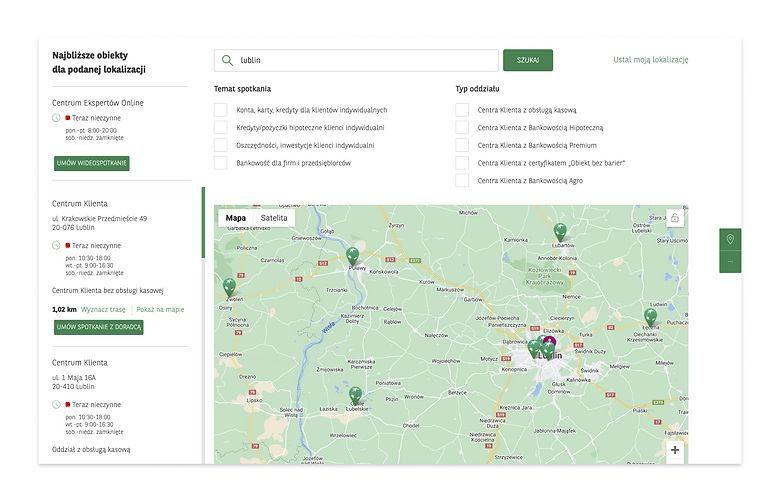
The BNP Paribas website offers a tool for locating its branches. The user can select different types of branches, such as Customer Centers with cash service, Customer Centers with Mortgage Banking, etc. The website also allows you to choose the topic of the meeting at the branch. The locations are presented in the form of a list, and the user can click on the selected branch to see more information and arrange a meeting with an advisor. The website also offers the "Get directions" function, which opens in a new Google Maps window.
-
Accessibility and Usability:
The tool is quite a simple and intuitive solution, but it does not offer a map integrated directly on the website. The user has to click on the link that takes him to Google Maps to see the location on the map.
mBank
-
It offers a map with the locations of branches and ATMs in the mobile application and on the website. Users can filter results by various criteria. The mBank website offers a tool for locating branches and ATMs. Users can find information about locations, opening hours, and telephone numbers
-
and scope of services. Various categories are available on the website, such as branches, ATMs, cash deposit machines and cooperating accountants with mBank.
-
The website does not offer an interactive map, but it does provide a list of facilities with their details.

Santander Bank Polska
-
The Santander website offers a tool for finding branches and ATMs. The user can choose between branches, ATMs and cash deposit machines. The website presents a list of available locations along with the distance from the selected point, opening hours and availability. However, there is no option to filter the results or view them on a map.
-
Accessibility and Usability:
The tool is simple in area and does not require advanced technical knowledge from the user. However, it does not offer a filtering or map function, which could make it easier to locate the nearest branch or ATM.

02
PAPER PROTOTYPING
The purpose of paper prototyping is to enable the rapid creation of user interface designs, before the expensive programming process begins. This method allows for the early detection and resolution of usability and user experience issues, which is crucial to the success of any digital product.

03
GUERRILLA TESTING
Guerrilla testing is a usability testing method that involves quickly and informally collecting opinions from random users. It is a low-budget but effective technique that allows you to obtain direct information about how real users react to your product or prototype. Paper prototyping allows you to quickly create user interface designs, before the expensive development process begins. This method allows for the early detection and resolution of usability and user experience issues, which is crucial to the success of any digital product.
-
Participant A:
-
Had difficulty finding the ATM's search function.
-
-
Participant B:
-
He had difficulty navigating; he needed additional guidance.
-
-
Participant C:
-
He managed to complete both tasks, but noticed that the process had several non-intuitive steps.
-
He suggested adding a short tutorial the first time you use the app.
-
General Conclusions:
-
The interface is generally intuitive for younger users, but may be difficult for older users.
-
There is a need to improve the accessibility and visibility of some key features.
-
Introducing a tutorial can help new users better understand the interface.
04
HI-FIDELITY & INTERACTIVE WIREFRAMES
05
STATIC WIREFRAMES


