
Fintech


SHARED ACTIVITIES
Task completed by a group of three people
PROBLEM
-
A very common difficulty in finding companions who share our individual passions.
DESIGN CHALLENGES
-
Research process full of interesting cases
-
A group predominantly open, aiming to make new acquaintances
-
Very often, they spend time agreeing to go out with friends just for the sake of going out, not because of shared interests
-
Matching people based on interests
-
Encouraging users to spend time together outside the home
-
Connecting people with similar interests and personalities
TARGET GROUP
-
A very thematic group that eagerly shares their experiences. They widely talk about their unsuccessful attempts to interest friends in their passions. However, they consistently pursue their passions. Even when doing so alone, it gives them a great sense of satisfaction.
RESEARCH METHODS
-
Research
-
Ideate
-
Competitive Analysis
-
UX Analysis
-
User Scenario
-
User Flow
-
Wire Flow
-
Lo-Fi Wireframes
-
Hi-Fi Wireframes
-
User Testing
-
UI Design
01
RESEARCH
The product idea is subjected to verification during the research process, as the true needs of its users are discovered. Every feature and solution in the product must stem from the data collected during the research.
DISCUSSIONS, ANALYSES, DESK RESEARCH
Expanding the knowledge base related to the product concept - the greater the knowledge, the better the questions asked in the interview.
BADANIE
Stage 1 - Pre-Screener - survey
This is the first stage of selecting participants for the study, broadly gathering people interested in the product. Individuals needed later for: interviews, low-fidelity wireframe tests, high-fidelity wireframe tests, UI prototype tests. Recruiting participants from discussion groups, forums, social media. The survey is conducted using Google Forms.
Construction of the pre-screener:
-
4 introductory sentences - a description of the product idea and the benefits that the user will gain - it is meant to encourage people to answer a few questions.
-
The first question concerns the name, as this way we determine the gender.
-
3 or 4 key questions related to the product idea - this allows for the selection of individuals who already have some experience with the product concept and can be its potential users.
-
The last question is related to the request for leaving contact information so that a phone call can be arranged..
Stage 2 - Screener - phone call
The goal is to further narrow down and select individuals who best fit the product concept. This involves delving deeper into the questions from the pre-screener.
Stage 3 - Interview - video conversation and observation
The goal is to further refine and select individuals who are the closest match to the product idea. This involves deepening the questions from the pre-screener. Questions are tailored to obtain information that could influence the future product. During the interview, we focus on the person and collect ancillary and empathetic data. Both verbal and non-verbal communication are important.
We constantly keep the product idea in mind but record everything the participant says. We do not talk about the product but rather about a 'solution'.
SORTING AND ORGANIZING DATA
Stage 1 - Creating a User Persona
We create a persona in relation to the product, but we empathize with various life problems. We give her credibility as a human character. By humanizing her and distinguishing her special features and personality traits, we create a real character that can exist in the minds of designers.

Stage 2 - Creating an Empathy Map
It can be used at any stage of the product's life.
It facilitates insight into the needs of a potential product user.

Stage 3 - Creating a User Journey Map
It is a visual interpretation of the relationship between the product and the customer from the perspective of time and space. Journey Map helps you understand the customer and allows you to answer the question - how and when the customer uses the product. Journey Map contains elements such as persona, time, place, interactions with the product (touchpoints) and emotions felt by the customer.

02
IDEATE
The aim of ideation is to identify the core of the product (the most important function in the product) and to specify its essential functions, i.e. in this case, to solve the problem of active people who want to pursue their passions together but have problems with making arrangements with others.
I participated in the brainstorming session with two other peoplewith the help of miro. Our work has shown that the most important core of our product is the credibility of events.

03
COMPETITIVE ANALYSIS
Performance analysis is available that helps not only to take into account the market and share, but also shapes when it comes to creation, creating products that are more attractive, accessible and accessible.

04
UX ANALYSIS
Product evaluation in terms of UX usability compared to competing solutions focuses on the most important aspects of a given product. Key areas are examined in detail to understand how the product stands out from other solutions available on the market. The analyzed products are not always direct competitors; they often come from different market segments. However, their functions and solutions can provide valuable tips and inspiration that are important for the development and improvement of the tested product.


05
USER SCENARIO
It is a description of how the user achieves his or her goals with a given product.
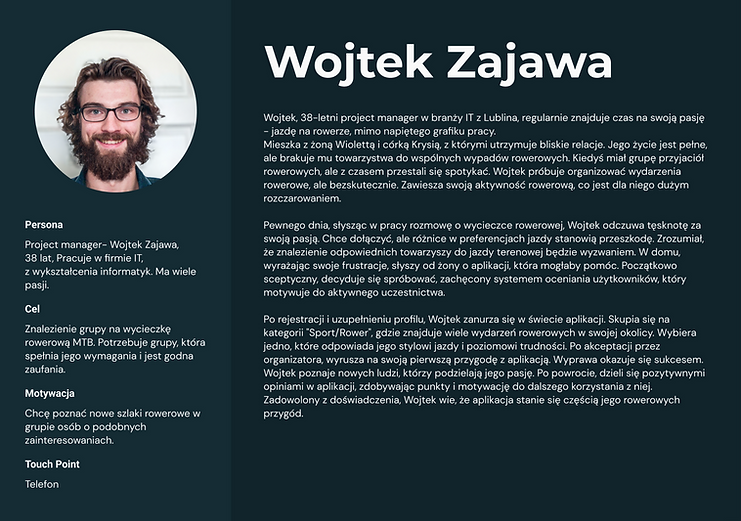
06
USER FLOW
User Flow is crucial in UX design, allowing you to understand and optimize the path a user takes when interacting with a product or service. The goal is to provide a smooth and intuitive path, minimizing obstacles and improving the overall user experience.
We focused on analyzing the subsequent stages of user interaction, from the first contact to achieving the goal, identifying barriers and points of frustration. We used a variety of research methods to gain a comprehensive picture of flow and develop strategies to improve interaction. Our goal was to create an effective and satisfying user path, which translates into better engagement and higher conversions

07
WIRE FLOW
Wire Flow analysis is crucial in UX/UI design, enabling the visualization of the user's interaction path with the product. The goal is to create a clear flow that guides the user from the beginning to the end of the interaction, ensuring an intuitive and positive experience. We focused on mapping screens and interactions, analyzing their connections and impact on the user experience.

STEP 1
Entering the application
The user enters the application, the first screen he sees is the login/registration screen. A user without an account can also log in as a guest. If he does not have an account and wants to create one, he goes to the registration process or can log in as a guest without logging in, and if he has an account, he logs in with his e-mail and password, or if he has forgotten his password/e-mail, he can ask for a reminder.
The main contact is email.
STEP 2
Event search page
It has several options available in the sources: internet search, search for events in the area - from browsing maps, search for categories and subcategories of events, search for events by date, and main events.
STEP 3
Page with a list of events
After setting the filters, the user goes to a page with a list of events that meet his search criteria. On this page he sees thumbnails of events with their titles, dates and a short description. The user can select a specific thumbnail to go to the event page. He can still shuffle through the MENU or go back using the arrow.
STEP 4
Page with the selected event
After selecting an event, the user goes to the event page, where all the detailed information is available. They can read the description, see the date, place, time, etc. and see the route on the map. On this page, the user can also go to the organizer's profile, write him a private message and ask a question on the event forum by selecting the "ask a question" button. You can return to the search results by selecting the left arrow. When he decides to join the event by selecting the "join" button, he is redirected to the login/registration page.
STEP 5
Not enough points
This screen appears when a user tries to join an event but does not have enough points to do so. This tells the user that they need to earn more points to be able to participate in that particular event. On this screen, the user can see the current number of points they have and can find information on how to earn points.
STEP 6
Confirmation page
On the confirmation page, the user has access to information about the event details, such as: date, time, place and name of the event. It also allows him to take further actions related to this event, such as adding it to the calendar or sharing it with other people. He also sees information that a reminder about the event will be sent to him.
08
LO-FI WIREFRAMES
Low Fidelity Wireframe (LO-FI) is an initial stage in UX/UI design, focusing on sketching the basic structure of the user interface. The goal is to quickly present key design elements, such as content layout and functionality, without graphical details.

09
HI-FI WIREFRAMES


10
USER TESING
After creating low-fidelity (LO-FI) wireframes, we moved to the "Prototype Testing" stage, where we tested the clickable prototype with real users. This stage was focused on collecting direct feedback from users regarding the usability and attractiveness of our design. We focused on observing how users interacted with the prototype to identify any usability issues and better understand their needs. Our clickable prototype allowed users to interact with key design features and navigation, giving us a realistic impression of how the final product would function. These tests were extremely valuable because they allowed us to detect and solve problems early, which significantly contributed to improving the quality and effectiveness of the final product.
After making changes to the prototype and testing the next iteration, we started designing the UI.
11
UI PROTOTYPE
High Fidelity Wireframe (HI-FI) is an advanced stage of UX/UI design, where accurate interface visualizations with full graphic details, colors and typography are created. The goal of HI-FI is to realistically represent the final product, enabling accurate evaluation and testing of the interface. In this process, we focused on precisely reproducing each design element, using advanced tools to create detailed wireframes. They are used for effective collaboration and communication with the team, clients and stakeholders, as well as for verifying design assumptions, ensuring that the final product will be consistent and intuitive.
At this stage, the colors, fonts and graphics were also selected.

